How to Adjust the Time on Your t:slim X2 Insulin Pump

Setting or adjusting the time on your t:slim X2 insulin pump for changes like daylight saving time ensures that your insulin delivery schedule remains accurate and up-to-date. Here's how:

  1. From the Home screen, tap OPTIONS and then the down arrow
  2. Tap Device Settings
  3. Tap Time and Date
  4. Tap Edit Time
  5. Tap Time and use the numeric keypad to update
  6. Tap the blue checkmark to confirm your changes
  7. Tap the green check mark to save your changes

Note: The steps above may differ depending on the software version of your insulin pump. Refer to the user guide for additional details about the date and time on your t:slim X2 insulin pump.
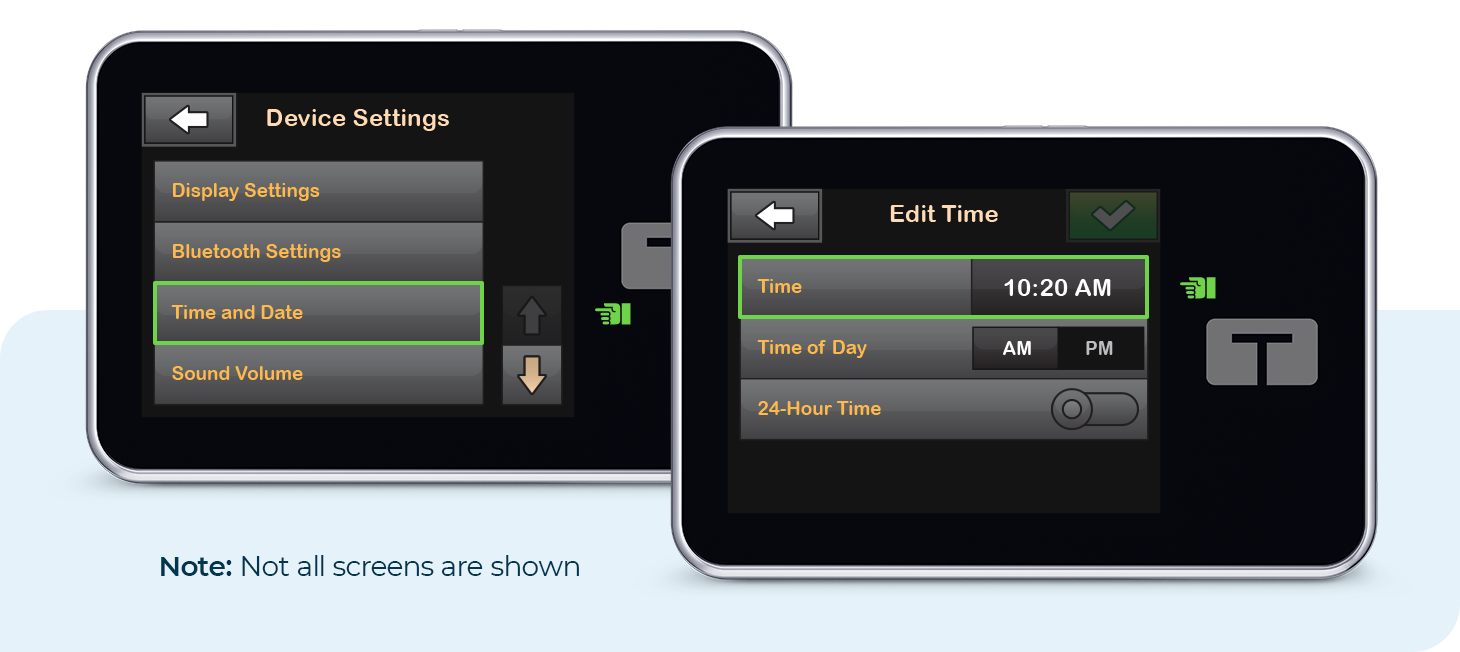
Device Settings and Edit Time Screens. Note: Not all screens are shown.

Back to All Articles
ZD-000107_B (2023-11-2)
ding-[1.5] text-brand-secondary\",\"children\":[\"$\",\"strong\",null,{\"children\":\"You don’t have permission to view this page\"}]}],[\"$\",\"p\",null,{\"children\":\"Click the button below and by the time you blink, you will have arrived back to the main page.\"}]]}]]}],[\"$\",\"div\",null,{\"className\":\"flex justify-center\",\"children\":[\"$\",\"$L29\",null,{\"href\":\"/\",\"label\":\"$undefined\",\"opensNewTab\":\"$undefined\",\"className\":\"button button--primary button--md min-w-[15rem]\",\"ref\":\"$undefined\",\"iconRight\":\"$undefined\",\"children\":\"Back to Home Page\"}]}]]}]}],[\"$\",\"div\",null,{\"className\":\"flex items-center justify-center\",\"children\":[\"$\",\"div\",null,{\"className\":\"flex h-full w-full items-center justify-center\",\"children\":[\"$\",\"img\",null,{\"src\":\"/images/tandem-pump-user-pediatric-william-546x580.jpg\",\"alt\":\"Pediatric William\",\"role\":\"presentation\"}]}]}]]}]}]}]\n"])