

Tandem t:slim Mobile AppBolus from your smartphone
Give yourself the freedom to more easily — and more discreetly — manage your diabetes with the Tandem t:slim mobile app.

Mobile Bolus Delivery
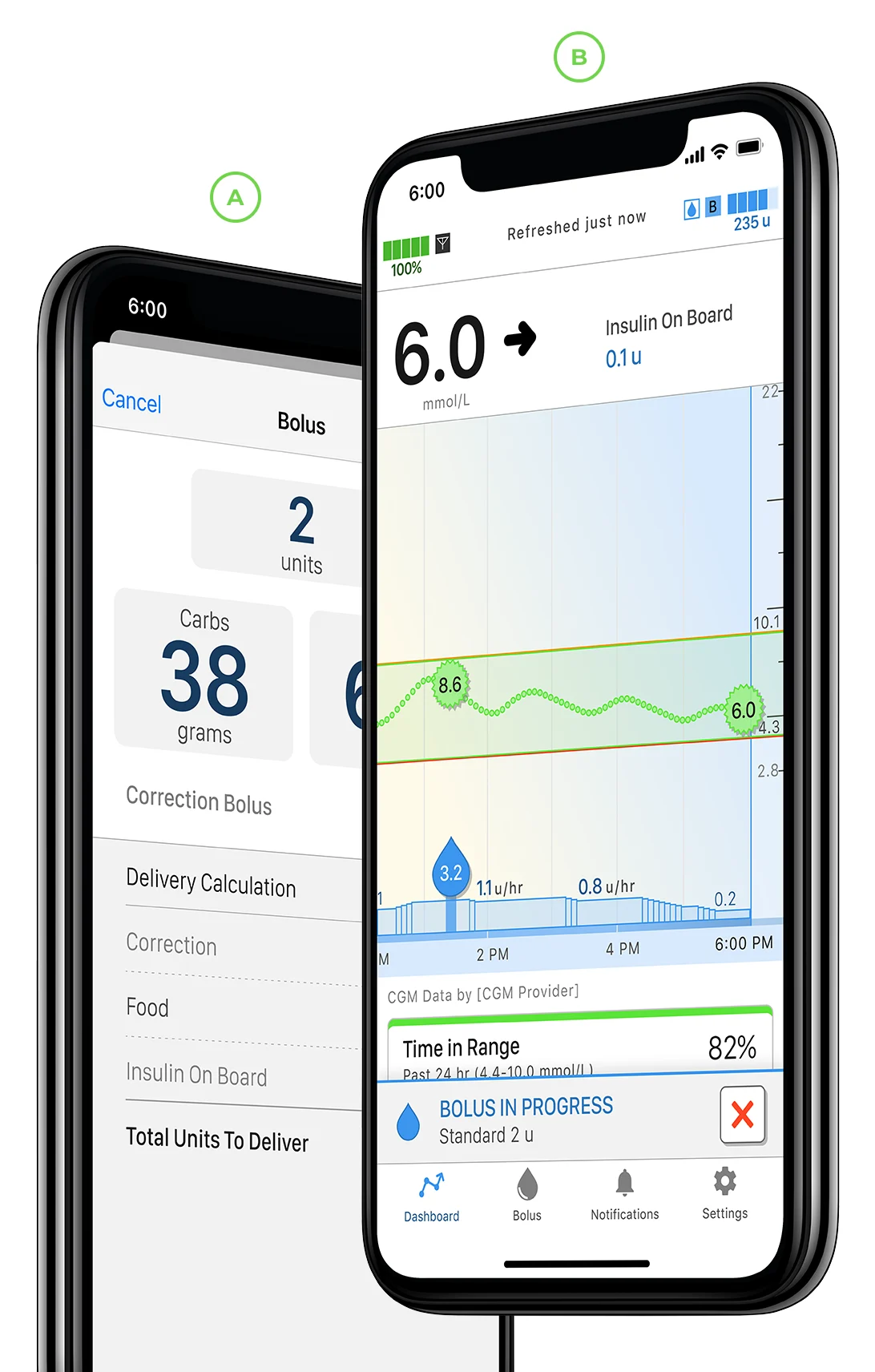
The Tandem t:slim mobile app allows you to bolus from your compatible smartphone* without touching your t:slim X2 insulin pump. That increased flexibility means you can choose to wear your pump in more places.

See Clearly
Conveniently view your pump data, including basal and bolus events, insulin on board, carbs, current settings, and both pump and sensor status from the app.

Freedom to be in the Know
Wirelessly upload your data to the cloud-based Tandem Source platform and allow your authorized healthcare provider(s) easy online access at their convenience.†
What's next?
Whether you're ready to get a Tandem insulin pump, or looking to check insurance coverage, you’ll find everything you need here.
Download the App
Our mobile app requires a compatible smartphone model and operating system. Before downloading the Tandem t:slim mobile app to your smartphone, let's make sure your device is compatible.
Note: Your t:slim X2 insulin pump must be on software version 7.8.1 or later to pair with app.
* Bolus delivery from the Tandem t:slim mobile app requires a compatible smartphone model and operating system, an app update, a remote software update on the t:slim X2 insulin pump and additional training.
† The information on the Tandem t:slim mobile app display may not be identical to the current status of the your pump. Wireless uploads from the Tandem t:slim mobile app to Tandem Source require a compatible phone and an internet or wireless data connection. Uploads to Tandem Source do not take place in real time and should not be relied upon by healthcare providers or caregivers for remote patient monitoring. Standard carrier data rates may apply.
Important Safety Information
Always read the label and follow the instructions: tandemdiabetes.com/safetyinfo
Tandem t:slim mobile app: The feature set available within the Tandem t:slim mobile app is dependent on the pump software version and the compatible smartphone’s model and operating system (OS).
The Display and Data Upload feature set provides a secondary display of pump and continuous glucose monitoring (CGM) information, including display of your pump alerts and alarms, and enables wireless uploading of pump and CGM data to the Tandem cloud through an internet or wireless data connection. Standard carrier data rates may apply.
The Bolus Delivery plus Display and Data Upload feature set additionally allows users to request, stop, and cancel a bolus on the pump from the Tandem t:slim mobile app. At least one smartphone security setting must be enabled to utilize the Bolus Delivery feature of the Tandem t:slim mobile app.
WARNING: Always rely on your pump to make therapy decisions when using a smartphone that is incompatible with the Bolus Delivery feature.
PRECAUTIONS: Always rely on your pump to make therapy decisions if using a smartphone that is incompatible, the smartphone is lost or damaged, or the smartphone loses Bluetooth® connectivity with your pump. Important pump alerts and alarms are only received as app notifications when enabled and the app is either active or running in the background.
The Tandem Source platform is intended for use by individuals with diabetes mellitus who use Tandem Diabetes Care insulin pumps, their caregivers, and their healthcare providers in home and clinical settings. The Tandem Source platform supports diabetes management through the display and analysis of information uploaded from Tandem insulin pumps.